![VoosteQ Model N Channel v1.0.7 VST [WIN]](https://goaudio.b-cdn.net/wp-content/uploads/2024/01/VoosteQ-Model-N-Channel-v1.0.0-60x60.png)


Really loving GoAudio.net! The audio quality is great, and the overall experience is smooth and enjoyable. Keep up the amazing…
Fill your request here and our team will try to post this material on the site

Native Instruments Absynth v6.2.0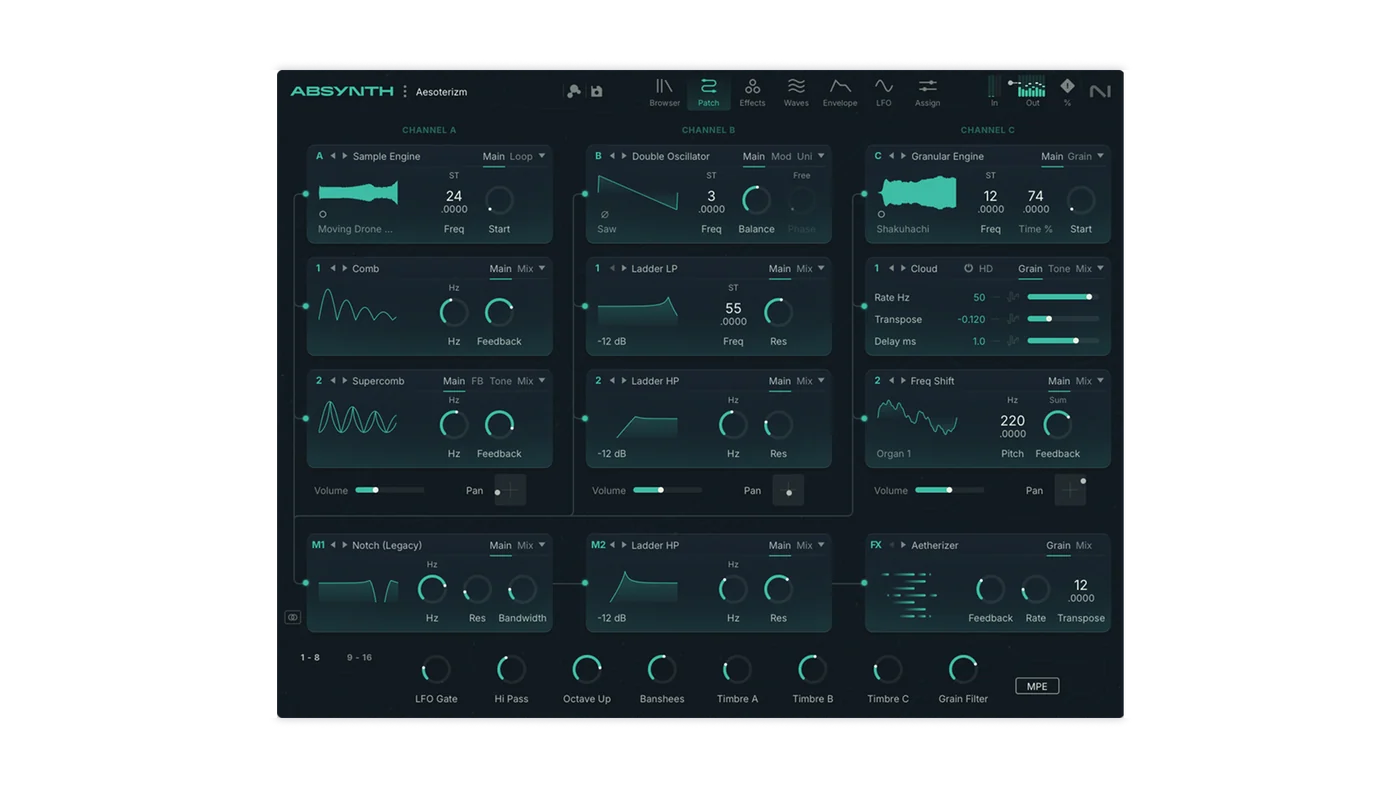
Absynth 6 marks the return of a legendary semi-modular synthesizer. Built for textures that transform and breathe, it invites you to shape sounds that are entirely your own. Deep enough for complex sound design, and intuitive enough for newcomers, it opens up distinctive, living sounds for cinematic cues, ambient soundscapes, and electronic productions.
Beyond ordinary synthesis
At the core of Absynth 6 is a hybrid engine that combines granular, FM, wavetable, and subtractive synthesis with deep modulation and a suite of creative effects. Its three oscillator channels give you structured unpredictability and endless room for exploration – perfect for sounds that evolve, shift, and surprise.
Discover new sounds
The Preset Explorer helps you find sounds by feel instead of scrolling through names. Navigate a sonic landscape where relationships between tones appear visually, leading you to unexpected discoveries and faster results.
Go beyond ADSR
Absynth 6’s 68-point envelope system offers looping, breakpoint curves, sustain stages, and time-synced transitions – plus dedicated modulation LFOs. These flexible shapes let you craft evolving textures and rhythmic motion that goes far beyond standard ADSR envelopes.
Mutate presets
With the Mutator, inspiration is only ever a few clicks away. Use it to morph different presets into entirely new ones, generating new variants in moments. Sculpt them into sounds you love – all while keeping a timeline of changes so you can quickly recall and refine your favorites.
Textural alchemy
Transform textures with Absynth’s signature granular effects. The Aetherizer turns any sound into shimmering atmospheres, while the Cloud Filter adds spectral motion and coloration. Together they create ambient motion that feels alive within your mix.
Release Notes 6.2.0 2026-10-12
ADDED
* Focus Mode: click a channel header to focus that channel and open an expanded editor below it
* Wave, Envelope, LFO, Macro, and Keyboard Editors in Focus Mode, selected from the Sidebar
* Editor Lock: prevents interactions in the channel strip from updating the editor
* Patch Focus: takes you from an item in an editor to its destination in the patch, in the Used By, Envelope, Macro, and Expression lists
* Channel headers with Solo, Mutate, and an Edit menu
* Channel Edit menu with Copy Channel, Paste Channel, Mutate Channel, Retry Mutate, Load Subpreset, and Save Subpreset
* Subpresets for channels, source modules, insert modules, effects, waveforms, and envelopes
* Load Subpreset dialog with Factory and User libraries, search, favorites, folders, Rescan, and Show on desktop. Selecting a subpreset loads it for auditioning; Cancel restores the previous settings
* Load Subpreset and Save Subpreset to the Edit menus of source modules, insert modules, and the effect module, and to the Transform menus of the Wave and Envelope Editors
* Embedded graphical previews for wave and envelope subpresets
* Global channel header, for entering Focus Mode on the Global channel
* Footer with macro knobs and an on-screen keyboard on all pages. In Focus Mode, its controls are integrated into the Macro Editor and the Keyboard Editor
* Poly AT / Mono AT, Pitch Bend, Mod Wheel, and Hold controls to the footer
* On-screen keyboard with octave buttons and a velocity and pressure display
* Computer keyboard input for the on-screen keyboard
* Keyboard Editor with Note Scale displayed directly above the keys, and a value display while drawing
* Assign button with single and multi assign modes, and an Assign menu listing all available parameters
* Assign mode indicators for available, assigned, and unavailable parameters. Clicking an assigned parameter reassigns it to the selected source
* MPE indicator on macro knobs and next to macro names in the macro lists
* Target Focus view in the LFO Editor, showing where a target is assigned across modules
* Envelope list states for envelope on/off and target module active/inactive
* Follow / Trigger switch for the Audio Modulators
IMPROVED
* Macros can be reordered by drag and drop, with undo and redo
* Macros can be renamed by double-clicking their name in the footer
* Macro knobs show their value on hover; macros without assignments are drawn dimmed
* Assignment lists support multi-select, bulk remove, and moving assignments to another macro while keeping Depth, Invert, and Smooth
* The Assign page gains the same list editing as the Macro Editor; the Add button is renamed Assign
* The Edit and Transform menus of the Wave and Envelope pages are merged into a single Transform menu
* Copy Channel and Paste Channel moved from the source module Edit menu to the channel Edit menu
* Solo now highlights consistently on all channels
* Legacy Absynth template files can be loaded as subpresets
* Renamed: Main channel to Global channel, Macro Control X to Macro X, Templates to Subpresets
Homepage:-https://www.native-instruments.com/products/absynth

Absynth620.dmg – 2.6 GB
Native-Instruments.Absynth.v6.2.0.rar – 2.5 GB
Fill your request here and our team will try to post this material on the site

Really loving GoAudio.net! The audio quality is great, and the overall experience is smooth and enjoyable. Keep up the amazing…

The sound quality is amazing. I absolutely love it!

Many, many thanks! That was super quick! I requested this file just yesterday and received it today. Wow, amazing service!…

Thanks for this amazing file! One of the best websites ever.

Thank you so much for sharing this file! This is truly one of the best websites I’ve ever come across.…