![Sonic Academy KICK 3 v1.1.8 [macOS]](https://www.goaudio.net/wp-content/uploads/2024/11/Sonic-Academy-KICK-3-v1.0.0-Incl-Patched-and-Keygen-R2R-60x60.png)


And how to get last three months libraries likes keep.forest one and fracture sounds trails 2 and compendium as iam…

Sonic Academy SideKick 1.0.3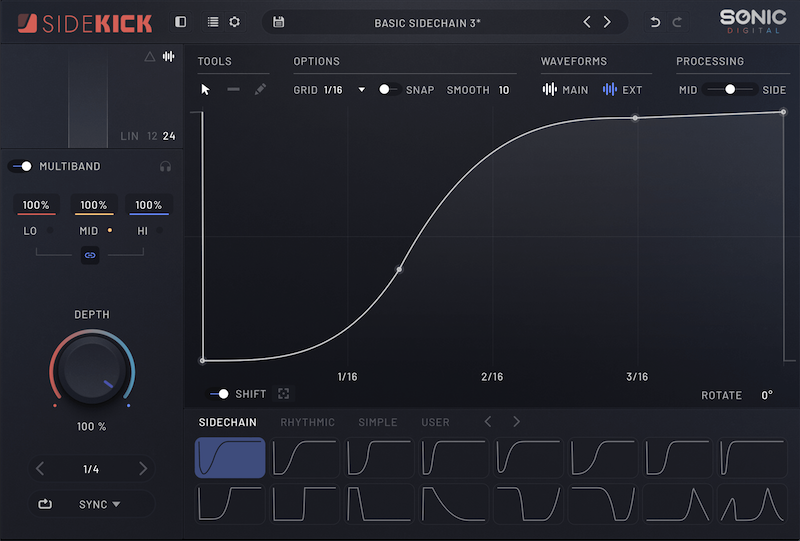
SideKick brings drawable volume envelopes, intelligent spectral ducking and sidechain ring modulation together in one plugin.
Get your kick and bass working together. Use your kick to drive precise volume ducking, target competing frequencies with spectral shaping, or explore sidechain ring modulation. Draw the envelope to shape how it reacts around each hit.
Precision envelope control.
Shape the exact sound you want to hear instead of fighting compressor settings. Add a node, bend a curve or draw freely.
• Add nodes, straight or curved lines and freehand drawing
• Snap nodes to grid
• Invert nodes by X and Y axes
• Rotate the envelope
• Apply smoothing to eliminate clicks
• Apply swing
Intelligent spectral ducking.
Your kick needs space, but that doesn’t mean your whole bass line needs to disappear. SideKick analyses the sidechain spectrum and builds a reversed EQ curve across 24 internal bands, reducing only the frequencies that compete.
Unlike conventional spectral sidechaining, SideKick’s envelope controls how much spectral ducking is applied over time. Keep the movement soft and transparent, or accentuate the shape when you want more pump.
Independent spectral attack and release controls let you fine-tune the response, while the envelope can control either spectral depth or traditional volume ducking after the spectral stage.
• 24-band inverse EQ follows the sidechain spectrum
• Shape spectral depth over time with the envelope
• Dial in transparent separation or a more pronounced pump
Multiband processing.
Split the signal and give your low, mid and high bands their own envelope and intensity.
Duck only the sub frequencies while keeping your upper harmonics flowing freely. Link the envelopes when you want them to move as one.
• 20 Hz–20 kHz, 2 adjustable crossovers
• Zero-latency, minimum-phase Linkwitz–Riley crossover
• Optional Linear phase crossover
• 12 or 24 dB/octave slopes and individual band solo
• Can be combined with Spectral and Sidechain Ring Mod modes
→ Five different modes. All in one plugin.
Sync to DAW, trigger from MIDI or Audio, or make use of our Spectral Ducking and Sidechain Ring Modulation.
✓ Tempo & transport. Stay locked to the DAW.
The envelope follows your DAW’s tempo and transport. Set the cycle length, add swing and build movement that lands exactly where you need it.
✓ Note triggered. Play your trigger.
Trigger SideKick from the MIDI notes. Maximum flexibility over triggering the envelope.
✓ Transient triggered. Use a sidechain input.
Detect trigger points using the incoming sidechain signal using threshold, hysteresis and hold controls. Filter the trigger signal to isolate a frequency to react to.
✓ 24-band analysis. Duck only what competes.
Analyse the sidechain across the spectrum and reduce the matching areas of your source. Keep the character of the sound while opening space where it matters.
✓ Ring Modulation. Ring Modulate your source signal.
Uses the sidechain signal to modulate the source through signal multiplication. Rather than selectively attenuating frequencies like Spectral mode, this rapidly changes the source’s spectral content while the kick is present.
Sidechain Ring Modulation.
Ring Mod multiplies your source by the sidechain signal, rapidly changing its spectral content while the kick is present. Unlike Spectral mode, it doesn’t selectively turn down competing frequencies—it creates new ones.
That speed can let your kick and bass play together without the obvious pump or volume dip of conventional sidechaining. The two sounds feel squeezed together while SideKick helps control the peak-level increase caused by their overlap.
Use the attack and release settings to smooth out colour and artifacts.
• Extremely fast response for overlapping kick and bass
• Control peak build-up without conventional pumping
• Use attack and release to balance speed against smoothness
Quick shift control.
Quick Shift lets you reposition the critical part of your duck in one move. Slide the bar to place the dip and recovery exactly where the groove needs them, without rebuilding the envelope node by node.
Edit the Quick Shift range and select the nodes you want grouped. Your custom selection then moves together whenever the timing needs a nudge.
Turn audio into your own envelope.
Record the incoming sidechain signal. SideKick captures its contour as an editable shape you can refine, save and reuse.
→ More Features:
Delta Monitoring.
Delta monitoring lets you audition the difference between input and output.
Mid/Side Processing.
Balance processing between Mid and Side, from the centre to the edges.
Waveform Display.
Main and external waveform overlays show how your signals interact.
Presets & Favourites.
Browse 100+ presets and keep your favourites close.
Grid, Snap & Swing.
Choose a grid from 1/2 to 1/64, snap nodes into place and add swing.
Undo & Redo.
Step backwards or forwards through edits without losing your flow.
One-shot or Loop.
Trigger the envelope once or loop it for continuous movement.
Sidechain Trigger Filter.
Set the frequency and bandwidth, then audition the filtered signal to isolate your trigger.
Linear Phase Crossover.
Optional linear phase crossovers in the multiband compressor.
Expanded View Mode.
Hides the sidebar to give an expanded view of the envelope.
Release Notes:
## v1.0.3
### Bug fix
– Fixed a potential crash when removing the plugin.
– Fixed plugin size constrain on external displays.
– Fixed “news” announcements appearing twice in the plugin.
Supported Operation System:
• macOS 10.13 or later
• Apple Silicon or Intel Core processor
Homepage:-https://www.sonicacademy.com/products/sidekick
Fill your request here and our team will try to post this material on the site

And how to get last three months libraries likes keep.forest one and fracture sounds trails 2 and compendium as iam…
Please send this link to me

"Amazing collection of audio plugins and sample packs. Thanks GoAudio!"

"One of the best websites for music producers. Keep up the good work!"

"Best audio website ever!"